Modular vs. Fixed: Flexible Modular Office Workstations Solutions
Author: Xinda Clover
Your workspace design directly impacts your daily team productivity. Companies grow and shift to modern hybrid work models frequently. Therefore, rethinking office layouts becomes a highly critical business decision. Choosing between fixed setups and flexible modular office workstations shapes your workspace permanently. Thus, this choice needs to align with your long-term goals. Ultimately, it must fit your budget constraints perfectly.
At XINDA CLOVER, we possess over 35 years of global manufacturing experience. Therefore, we help businesses choose the best flexible modular office workstations for their specific needs. From small startups to large corporations, we see amazing transformations daily. In this guide, we break down the key differences clearly. Finally, we show how our VL/SL series elevates your office completely.
What Are Flexible Modular Office Workstations?
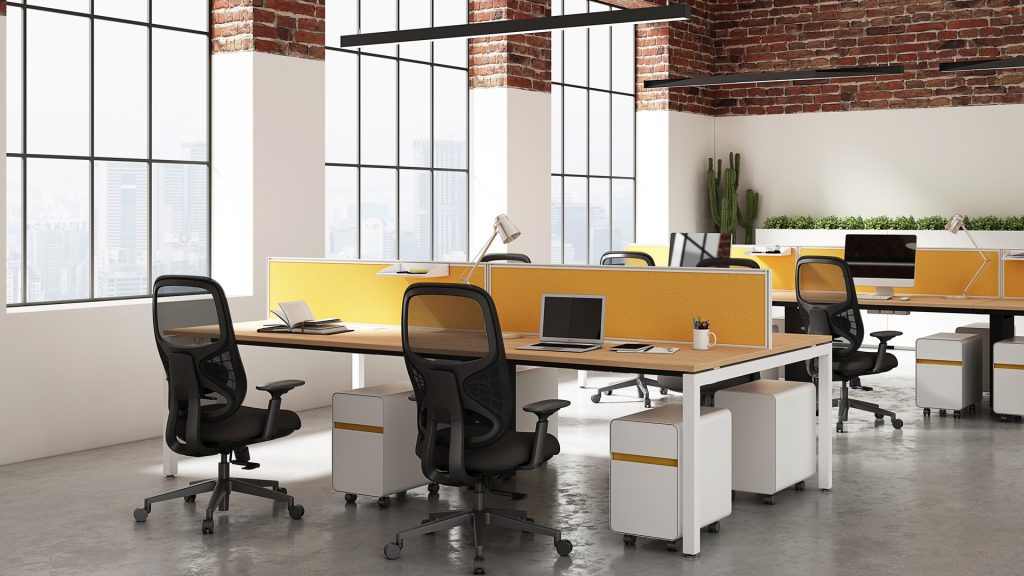
Flexible modular office workstations are highly customizable modern office setups. They are made up of smart interchangeable furniture components. Think of them as versatile building blocks for your office. Therefore, you can rearrange, expand, or reconfigure them easily. Unlike fixed workstations, these modular systems grow with your business actively. Thus, they are an incredibly popular choice for modern dynamic businesses. Consequently, you are never locked into a single rigid layout.
Core components include standardized desk surfaces and partition panels. The best part is that all parts fit together easily. Therefore, you will never need extensive construction or specialized tools. You might start with a single desk initially. Then, you can expand to a cluster as your team grows. Ultimately, you can reconfigure sections into collaborative pods quickly.
Key Design Features of Flexible Modular Office Workstations
What sets flexible modular office workstations apart from traditional setups? Our premium VL/SL series focuses on functionality without sacrificing style.
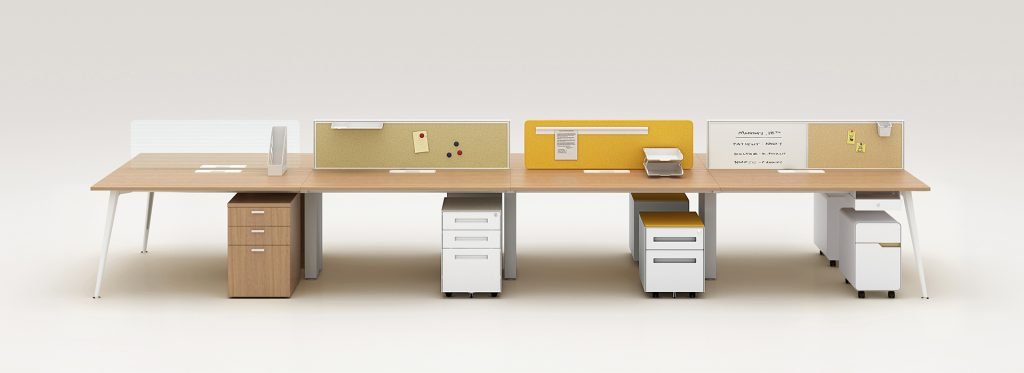
Interchangeable Components: Every part is designed to fit universally together. Thus, you can add or remove components without starting over. Our VL/SL series uses a brilliant standardized connection system. Consequently, you can assemble a complete workstation in under 30 minutes.
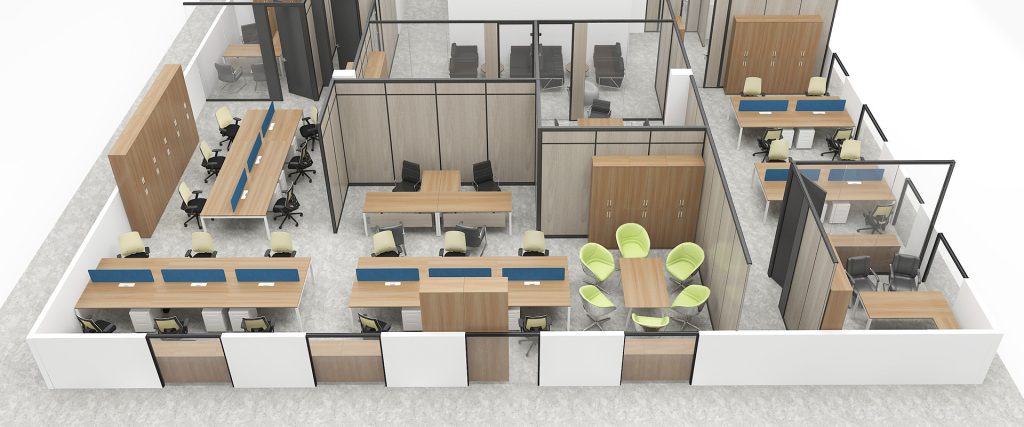
Customizable Configurations: These setups can be tailored to fit perfectly anywhere. Choose from linear layouts for focused individual deep work. Alternatively, select cluster layouts for active team collaboration. The VL/SL series offers over 20 different structural configurations.
Integrated Storage: Built-in under-desk drawers and overhead cabinets maximize space. Moreover, all storage options are fully compatible with VL/SL components. Therefore, you get a clean workspace without cluttering the area.
Hybrid Work Adaptability: Teams work hybrid schedules very frequently these days. Thus, flexible modular office workstations support hot-desking brilliantly. The VL/SL series includes highly mobile components for quick changes. Ultimately, you can create flexible zones as your daily attendance shifts.
Core Advantages of Flexible Modular Office Workstations
The agility of flexible modular office workstations delivers real long-term value. Therefore, they are absolutely worth the initial financial investment.
Scalability for Growth: Fixed workstations lock you into a static layout permanently. Modular systems solve this by letting you add components incrementally. Thus, you avoid costly renovations and stressful office downtime completely.
Changing Work Styles: Modern teams need spaces for diverse daily activities. Therefore, you can adapt your space to these specific needs quickly. The VL/SL series features adjustable acoustic partitions for instant privacy control.
Long-Term Cost-Efficiency: They save you significant money in the long run. Fixed workstations require full replacements for any layout changes. Conversely, modular components can be reused and reconfigured endlessly.
Space Utilization: Space is a highly valuable resource in any office. Thus, flexible modular office workstations make the most of every square foot. Consequently, they fit the exact unique dimensions of your room.
Who Should Choose Modular Workstations?
Modular workstations are a great fit for businesses that:
Plan to grow their team in the next 1–5 years
Use hybrid or flexible work models
Have diverse teams with varying work style needs (focus, collaboration, etc.)
Prioritize sustainability and want to reduce furniture waste
Need to maximize space utilization in their office
Plan to rearrange their workspace regularly (quarterly, annually, etc.)
Think startups, tech companies, creative agencies—any business that values agility. For example, a marketing agency we worked with uses VL/SL series modular pods for their design team and individual desks for their content team. When they need to host client presentations, they reconfigure the space in an hour or two—no stress, no hassle.
What Are Fixed Office Workstations?
Fixed office workstations are permanent and completely static furniture systems. Therefore, they are bolted securely to the floor or wall. They are usually custom-built to fit a very specific layout. Unlike modular setups, they prioritize absolute stability and a consistent aesthetic. Thus, they are the standard choice for offices expecting zero layout changes.
Key Design Features of Fixed Workstations
Permanent Installation: They are immovable once they are fully installed. Consequently, you will need extensive construction to rearrange them later.
Static Configurations: They cannot be easily reconfigured after the initial setup. Therefore, adding a new desk requires a time-consuming renovation process.
Lower Upfront Cost: Their simpler design makes them more affordable initially. Thus, they suit businesses with tight budgets and stable team sizes.
Consistent Aesthetic: They create a uniform and cohesive look throughout your office. Ultimately, this projects a highly professional brand image for visitors.
Core Advantages of Fixed Workstations
While fixed workstations lack the flexibility of modular systems, they offer several benefits that make them a viable choice for certain businesses. Here’s what to consider if you’re leaning toward fixed:
Who Should Choose Fixed Workstations?
Fixed workstations are best suited for businesses that:
Have a stable team size with no plans for expansion in the next 5+ years
Use a traditional, static work model (no hybrid or flexible work)
Prioritize a consistent, uniform aesthetic in their office
Have a tight budget and need to minimize upfront costs
Rarely rearrange their workspace
Examples include law firms, banks, government offices, and small businesses with stable teams. For instance, a law firm we worked with uses fixed workstations to create a professional, consistent look throughout their office, with private offices and cubicles that don’t need to be rearranged. It fits their brand and their workflow perfectly.
Fixed Setups vs. Flexible Modular Office Workstations
To help you make an informed decision, here’s a side-by-side comparison of modular and fixed workstations across the factors that matter most to businesses. We’ve kept it straightforward—no jargon, just the facts:
Factor
Modular Office Workstations
Fixed Office Workstations
Flexibility
High: Quick reconfiguration for hybrid/work style changes.
Low: Permanent; requires construction to rearrange.
Scalability
High: Incremental component additions; no full replacement.
Low: Discarded during layout changes; less eco-friendly.
Xinda Clover VL/SL Series: Your Ideal Flexible Modular Office Workstations
For businesses prioritizing scalability, our VL/SL series is the perfect fit. Built on decades of expertise, it combines durability and customization seamlessly.
Case Study 1: Fast-Growing Tech Startup (Singapore)
A tech startup in Singapore came to us with a problem: they needed a workspace that could grow with their team, which was expected to expand from 20 to 80 employees in 18 months. They also needed a flexible layout that could support both individual focus and team collaboration—something their previous fixed workstations couldn’t provide.
We recommended the VL/SL series, starting with 20 single-user workstations and 5 collaborative pods. As their team grew, we added 60 more workstations incrementally, reconfiguring the layout to create dedicated focus areas and meeting zones. The result? They saved over 40% on renovation costs compared to a fixed workstation setup, and their employees reported a 25% increase in productivity—all thanks to the flexible, comfortable workspace. Their CEO told us it was “one of the best investments we made during our growth phase.”
Case Study 2: Large Corporate Office (USA)
A Fortune 500 company in the USA needed to adapt their office to a hybrid work model, with 50% of employees working in the office and 50% working remotely. They needed a workspace that could support hot-desking for remote employees and dedicated desks for in-office staff—something their old fixed workstations couldn’t handle.
We designed a custom VL/SL series layout with 100 hot-desking workstations (equipped with charging ports and video call accessories) and 50 dedicated workstations. The modular design let them reconfigure the space monthly, adjusting the number of hot desks based on employee attendance. They saw a 30% reduction in office space costs and a 20% increase in employee satisfaction—proving that flexibility pays off in more ways than one.
How to Choose: Step-by-Step Guide
Still unsure which workstation type is right for your business? Don’t worry—we’ve put together a simple step-by-step guide to help you make the right choice. It’s based on what we tell our own clients when they’re on the fence:
Step 1: Evaluate Your Business Goals
Start by asking yourself: What are your long-term goals? Do you plan to grow your team in the next 1–5 years? Will you be adopting a hybrid or flexible work model? If your goals involve growth or flexibility, modular workstations are likely the better choice. If your team size is stable and you have no plans for layout changes, fixed workstations may be more suitable. It’s all about aligning your workspace with where your business is going.
Step 2: Assess Your Workspace Needs
Consider your office space size and layout. Do you have a small office that needs to maximize space? Do you need to create distinct zones for focus and collaboration? Modular workstations are better for maximizing space and creating flexible zones. Fixed workstations are better for creating a uniform look in larger, more static spaces. Be honest about your space constraints—don’t force a solution that won’t fit.
Step 3: Analyze Your Budget
Evaluate your upfront and long-term budget. If you have a tight upfront budget and no plans for expansion, fixed workstations may be more affordable. If you can invest more upfront and want to save money in the long run, modular workstations are a better investment—they reduce replacement and renovation costs over time. Remember: cheap upfront doesn’t always mean cheap in the long run.
Step 4: Consider Your Team’s Work Styles
Think about how your team works. Do they need space for focused individual work, collaborative projects, or both? If your team has diverse work styles, modular workstations can be reconfigured to support each style. If your team uses a traditional, static work model, fixed workstations may be more appropriate. Your workspace should work for your team, not against them.
Step 5: Consult with a Professional
At XINDA CLOVER, our team of workspace experts is here to help. We offer free space planning consultations, where we assess your office space, discuss your business goals, and recommend a solution that fits your budget and needs. Don’t hesitate to reach out—we’re here to make the process easy. We’ve helped thousands of businesses make this decision, and we can help you too.
Common Mistakes to Avoid When Choosing Office Workstations
To ensure you make the right decision, avoid these common mistakes we’ve seen businesses make time and time again:
Focusing Only on Upfront Cost: Many businesses choose fixed workstations because of their lower upfront cost, but they fail to consider the long-term costs of renovation and replacement. Modular workstations may cost more upfront, but they save money over time. It’s a classic “penny wise, pound foolish” scenario.
Ignoring Future Growth: If you plan to grow your team, choosing fixed workstations will limit your ability to expand without incurring significant costs. Always consider your long-term growth goals when making a decision. We’ve seen businesses regret choosing fixed workstations after just a year or two of growth.
Overlooking Employee Comfort: Both modular and fixed workstations should be ergonomically designed to support employee health and productivity. Don’t sacrifice comfort for cost or aesthetics. Uncomfortable workstations lead to unhappy employees, lower productivity, and higher turnover—none of which are good for business.
Not Testing the Furniture: Before making a large purchase, test the workstations to ensure they’re comfortable, durable, and functional. We offer free product samples and demonstrations to help you make an informed decision. There’s nothing worse than investing in furniture that doesn’t work for your team.
Conclusion
The choice between modular and fixed office workstations is a defining moment for your corporate culture and your bottom line. While fixed desks offer traditional stability, the VL/SL Series modular workstations provide the agility, scalability, and long-term savings that the modern economy demands.
At XINDA CLOVER, we don’t just sell furniture; we design the future of work.
Ready to future-proof your office?Contact our workspace experts today for a free consultation and customized quote. Let’s build a workspace that grows with you.